PrintBlob Pro installed in one click
After paying for PrintBlob Pro, the page you land on has an Install PrintBlob Pro button. It opens your shop, where PrintBlob installs PrintBlob Pro, activates it and connects your licence, with no file to upload and no key to paste. Your shop installs only a release signed by PrintBlob, downloaded from printblob.com over HTTPS, after checking its checksum and signature.
Published , updated , by the PrintBlob team.
What happens when I press Install PrintBlob Pro?
The checkout knows which shop it came from when you opened it from a PrintBlob Pro link in your shop’s admin; otherwise you type the shop’s address on the page after paying. Install PrintBlob Pro sends you to that shop with a short-lived, single-use permission tied to your licence and that shop. The free plugin’s upgrade screen then downloads PrintBlob Pro from printblob.com, checks it, installs it, activates it and connects the licence, and you land on PrintBlob › PrintBlob Pro.
Why is it safe?
Your shop installs only a release signed by PrintBlob: it downloads it from printblob.com over HTTPS and installs it only after its SHA-256 checksum and its Ed25519 signature check out. The permission to connect your licence lasts minutes, works once, and only for the shop you named. From then on, updates arrive in Dashboard › Updates like any other plugin’s, checked the same way.
Who is it for?
Every PrintBlob Pro buyer. It turns buying an add-on, downloading a zip, uploading it and pasting a key into one button.
Is it free or Pro?
The button comes with buying PrintBlob Pro; it needs the free PrintBlob plugin on the shop, which is what installs Pro. The pricing page compares the two.
How do I install PrintBlob Pro in one click?
- Buy a licence. On the pricing page: $69 a year or $99 once (limited-time offer until 31 December 2026), with a full refund within 14 days. Opened from a PrintBlob Pro link in your shop's admin, the checkout already knows your shop.
- Select Install PrintBlob Pro. On the page you see after paying. If it does not know your shop yet, type your shop's address there first.
- Sign in to your shop if WordPress asks. As an administrator. Your shop opens in the same tab.
- Done. PrintBlob installs and activates PrintBlob Pro and connects your licence, then shows PrintBlob › PrintBlob Pro: what Pro adds and where each feature is set up.
Set it up
- Installation
PrintBlob needs WordPress 7.0, WooCommerce 10.0 and PHP 7.4 or newer. Install the free plugin from the WordPress.org directory or as a zip, set up your first product, then add PrintBlob Pro when you need it.
- Licence and updates
A PrintBlob Pro licence turns on Pro's features, with automatic updates and priority email support, on one domain. Activate it in WordPress, move it to another domain from your account, and renew a yearly licence; when one ends, PrintBlob Pro keeps working without updates.
- PrintBlob Pro
PrintBlob Pro adds print-ready files of every order (a 300 DPI PNG, a vector PDF and SVG, and a CMYK PDF through your printer's profile) with the customers' original images, your own products and photos, back and sleeve printing, a 3D view, design templates, a clipart library, quantity breaks, names and numbers for team orders, a print queue with ZIP downloads, and your own fonts.
Questions
What if my host does not let WordPress install plugins?
PrintBlob says why and offers the download. Upload it under Plugins › Add Plugin › Upload Plugin, and PrintBlob Pro takes the licence when you activate it, with no key to paste.
Can the licence end up on the wrong site?
No. It goes only to the shop named on the page after paying; anywhere else, printblob.com asks you to choose the licence yourself.
Can I still install it by hand?
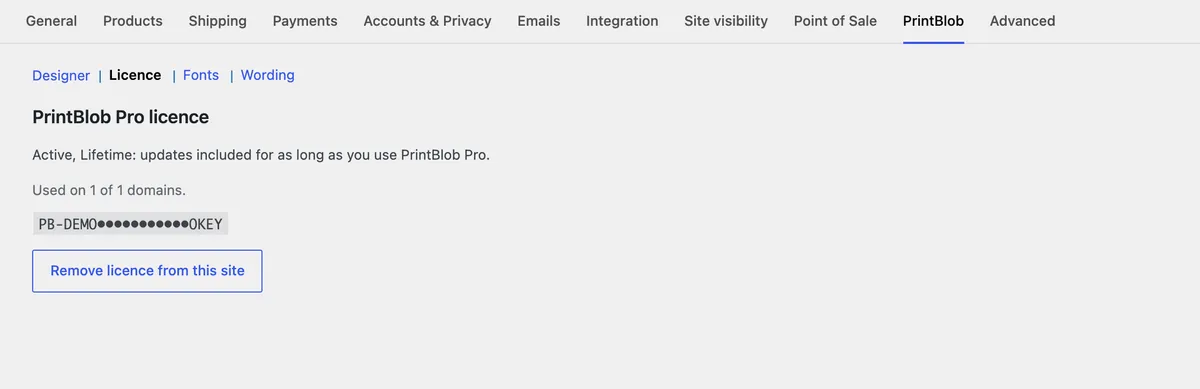
Yes. Download PrintBlob Pro, upload it like any plugin, and connect your licence or paste its key under WooCommerce › Settings › PrintBlob › Licence.
Get PrintBlob Pro
Pro adds print-ready files, back printing, a 3D view and a production print queue to the free designer. Paid with Stripe in US dollars, no tax added; one domain per licence.
$69 a year
Full refund within 14 days
Limited-time offer until 31 December 2026
$99 once
Full refund within 14 days
Try it on your own shop
PrintBlob is free in the WordPress.org plugin directory: install it, turn the designer on for a product and take a design order. PrintBlob Pro is $69 a year or $99 once (limited-time offer until 31 December 2026), with a full refund within 14 days.