Mockups and print areas
A mockup is what customers design on: a photo of each printable side, the print area drawn on the photo, and the real print size in centimetres. The free plugin prints on the front of its bundled t-shirt mockup. PrintBlob Pro adds the mockup editor for your own products and photos: mugs, hoodies, bags, anything you print on.
Free, with more in PrintBlob Pro
Published , updated , by the PrintBlob team.
Free or Pro?
- Free Front printing on the bundled product, with its own print price.
- Pro Your own products: mugs, hoodies, bags, on your own photos, with print areas drawn on them.
What is a mockup?
Everything about printing a design follows the mockup. The designer shows its photo with the print area as a dashed line; the customer can place anything inside it; the print size in centimetres decides the size of the print files. A print area of 28 × 36 cm gives a PNG of 3307 × 4252 pixels at 300 DPI, and a PDF and an SVG whose page is 280 × 360 mm.
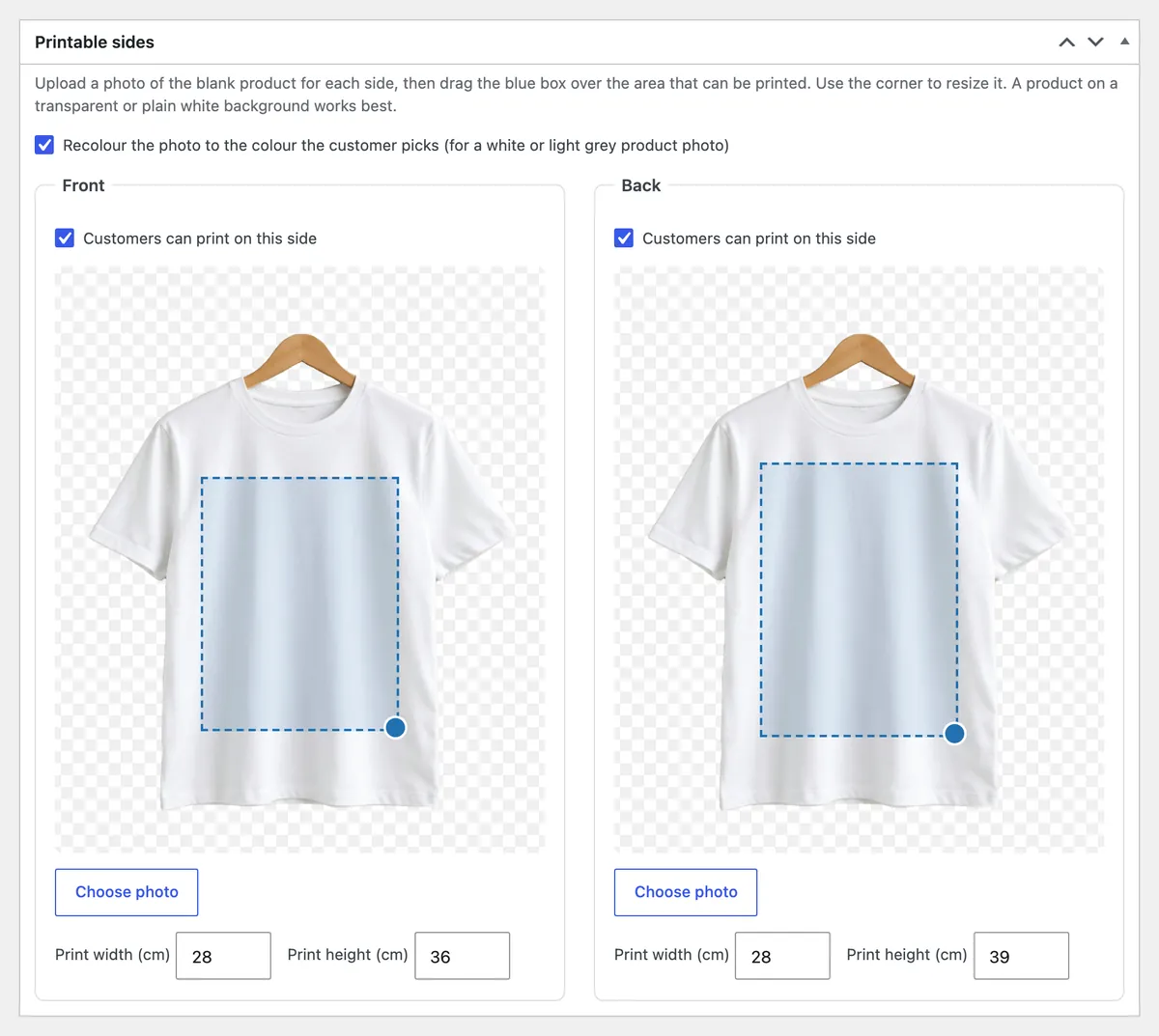
PrintBlob creates a T-shirt mockup when you activate it, with photos of the front and the back and print areas of 28 × 36 cm and 28 × 39 cm. Its two photos are the same shirt on the same hanger, which is what lets PrintBlob Pro’s 3D view turn it round.
Free or Pro: which mockups can I use?
The free plugin prints on the front of the bundled t-shirt, so a shop can sell custom t-shirts the day it installs PrintBlob. Making and editing mockups, for your own products on your own photos, is PrintBlob Pro, and so are the back and the sleeves as printable sides (see front, back and sleeves).
Who needs their own mockups?
Shops that print on more than one product, or that want their own blank on the product page: a hoodie with a smaller chest area, a tote bag, a mug’s wrap, a cap’s front panel. The guide print areas and print sizes shows how to measure them and links the common sizes for each product.
What makes a good mockup photo?
A product on a transparent or plain white background, the same framing and size for every side, evenly lit. For recolouring, a white or light grey product. The guide photographing t-shirts for a product designer covers it step by step.
How do I make a mockup of my own product?
- Open the mockups. With PrintBlob Pro, open PrintBlob › Mockups and select Add mockup, or edit the T-shirt.
- Give each side a photo. For each side, tick Customers can print on this side and select Choose photo.
- Draw the print area. Drag the blue box over the area that can be printed, and use its corner to resize it.
- Enter the real print size. Enter Print width (cm) and Print height (cm): the physical size the print area stands for. The print files are made at that size.
- Use it on a product. Select Update, then choose the mockup in the product's PrintBlob designer tab.
Try it in the live demo
The designer on a blank t-shirt. The designer as a customer meets it on a product page: the t-shirt photo with its print area of 28 × 36 cm drawn on it, the tools, the colours, the sizes and the price. Everything here is the plugin's own code, running in your browser.
Set it up
- Mockups
A mockup is a product photo for each printable side, with its print area and the real print size in centimetres. PrintBlob Pro makes every order's print files at that size: a 300 DPI PNG, a vector PDF and an SVG.
- Products
To sell a product with the designer, open the product's PrintBlob designer tab, turn the designer on, choose its mockup and set a print price for each printed side.
- PrintBlob Pro
PrintBlob Pro adds print-ready files of every order (a 300 DPI PNG, a vector PDF and SVG, and a CMYK PDF through your printer's profile) with the customers' original images, your own products and photos, back and sleeve printing, a 3D view, design templates, a clipart library, quantity breaks, names and numbers for team orders, a print queue with ZIP downloads, and your own fonts.
- Print areas and print sizes: measure your products and set each side
How to measure the print area of your own blanks, where to find the common sizes for each product, how centimetres, DPI and pixels relate, and how to set a print area and print size per side so every print file comes out the right size.
- Photographing t-shirts for a product designer
How to photograph your own blank shirts so customers can design on them: hanger or flat lay, light, a white shirt for every colour, front and back that match, a transparent background, and the print area in centimetres.
- Sell custom hoodies, mugs, tote bags and caps in WooCommerce
How to add hoodies, mugs, tote bags and caps next to t-shirts in a WooCommerce shop with a product designer: what changes for each product, its print areas and sizes, the photos it needs, and how to set each one up as a variable product with its own mockup.
Questions
What does the free plugin print on?
The front of its bundled t-shirt mockup, with a print area of 28 × 36 cm. PrintBlob › Mockups shows it with its print area drawn on the photo.
Can I sell mugs, bags or hoodies?
Yes, with PrintBlob Pro: each is a mockup on your own photo, with its own print area and size. Mockups made with an earlier PrintBlob keep working without Pro.
What if I change a mockup's print size later?
It affects new designs only. Designs already in carts and orders keep the size they were made at.
Get PrintBlob Pro
Pro adds print-ready files, back printing, a 3D view and a production print queue to the free designer. Paid with Stripe in US dollars, no tax added; one domain per licence.
$69 a year
Full refund within 14 days
Limited-time offer until 31 December 2026
$99 once
Full refund within 14 days
Try it on your own shop
PrintBlob is free in the WordPress.org plugin directory: install it, turn the designer on for a product and take a design order. PrintBlob Pro is $69 a year or $99 once (limited-time offer until 31 December 2026), with a full refund within 14 days.