DTF gang sheet builder for WooCommerce: sell gang sheets and transfers on your own website
How to sell DTF gang sheets and transfers from a WooCommerce website: sheet sizes as variations, a finished sheet uploaded with the order or a gang sheet builder plugin, the file a sheet needs, pricing by size or length, and how a shop that also prints shirts gangs its own orders.
Published , by the PrintBlob team.
To sell DTF gang sheets on a WooCommerce website, make one product with each sheet size as a variation, then either let customers upload a finished gang sheet file with the order or add a gang sheet builder plugin, where they upload their designs and arrange them on the sheet in the browser. WooCommerce has no gang sheet builder of its own. The WordPress.org directory lists a few, some free and some that connect your shop to a paid service. PrintBlob is not one of them: it is a product designer, where customers put a design on a t-shirt, and it does not arrange designs on a sheet. If you also sell printed shirts, its print files are what you gang onto your own sheets.
This guide covers what customers buy when they buy a gang sheet, the three ways to sell one in WooCommerce, the file a sheet needs, and how to price it. The plugins below were read in the WordPress.org directory on 21 October 2026.
What customers buy when they buy a gang sheet
A gang sheet is one length of DTF film with many designs printed on it side by side, so that nothing between them is wasted. The customer cuts the transfers apart and presses each onto a garment. Gang sheets are sold to people who press their own: other print shops, crafters, teams and small brands.
So a gang sheet shop sells a size of film, not a garment. Its width is your printer’s film width; its length is what you sell by. The customer decides what goes on it: a hundred small logos, or a few full fronts and the left chest logos that go with them.
That is the difference from a shop that sells printed shirts. There the customer designs one shirt, and you put many customers’ designs on one sheet yourself, out of their sight. A DTF shop can sell both, as two kinds of product.
How to sell gang sheets, step by step
- Choose the sheet sizes and price them. Take the width from your printer’s film and choose the lengths you sell. Price each from what a sheet costs you in film, ink, powder and time, plus a share of the machine and misprints, and your margin.
- Make the gang sheet product. Add a variable product with a Sheet size attribute, one variation per size, each with its price.
- Choose how the artwork reaches you. Add a file upload field with a product add-ons plugin for customers who send a finished sheet, or install a gang sheet builder plugin, where customers upload their designs and arrange them on the sheet in the browser.
- Put the file rules on the product. Next to the upload field or the builder’s button, say what the file must be: a PNG with a transparent background, 300 DPI at the printed size, no half-transparent pixels, and space between the designs to cut them apart.
- Place a test order and print it. Order your largest sheet as a customer, on a phone and on a computer, download the file from the order, and print and press it before you open the product to customers.
Three ways to sell gang sheets in WooCommerce
All three start the same way: a variable product, for example “DTF gang sheet”, with a Sheet size attribute and one variation per size, each with its price. What differs is how the artwork reaches you.
1. Customers upload a finished gang sheet
The customer lays out the sheet in their own software and uploads one file at the sheet’s size. You need a file upload field on the product, which a product add-ons plugin gives: WooCommerce personalised product plugins covers what those plugins do, and Let customers upload a logo or photo covers uploads in detail.
This suits customers who already make their own sheets, often other print shops, and it costs nothing beyond the upload field. It leaves you checking each file before printing: its size in pixels, its background and its half-transparent areas.
A full sheet is a large file. WordPress caps uploads at a size your host sets, and its media upload screen shows it as the “Maximum upload file size”; check that a sheet at your largest size fits under it, or ask your host to raise it.
2. A gang sheet builder plugin
A builder lets customers upload their separate designs, arrange them on the sheet in the browser, and order the sheet; you receive the sheet’s print file with the order. In the WordPress.org directory on 21 October 2026:
- DTFBuild Gang Sheet Builder (30+ active installs) connects your shop to DTFBuild, a separate service where the builder runs. Its listing says it reads each variation’s sheet size from its name, such as “22×50”, makes PNG or PDF files, nests designs to save film, and can sell by roll length with a minimum length. It needs a DTFBuild account. Customers’ uploads are processed and stored by DTFBuild, which its listing says deletes them about 15 days after upload; read its terms and its prices on its own site before you choose it.
- record7 Gang Sheet Studio (fewer than 10 active installs) runs in your own site with no account. Its listing says customers upload JPG or PNG files, place and resize them by hand, and the plugin makes one flattened PNG that you download from the order screen; it is placed on a page with a shortcode. Automatic nesting, rotation, duplication and DPI reporting are in its Pro edition, which is distributed separately.
Both are new: DTFBuild was added to the directory in May 2026 and has one rating, record7 in July 2026 and has none. Before you choose, open each in a test shop and build a sheet the way your customers will: on a phone as well as a computer, with a large file, and with a design that is too small to print sharply. Then print the file it gives you.
3. Single transfers by size
Some customers want ten of one logo, not a sheet. Sell single transfers as their own product, with a variation per size, such as “up to 4 × 4 in” or “up to 11 × 11 in”, a quantity, and an upload field for the design. You then put the transfers of several orders on one sheet yourself, as you would for shirts (below). It suits customers who do not want to lay out a sheet, and it puts the layout work on you.
The file a gang sheet needs
A gang sheet file follows the rules of any DTF file, at the size of the whole sheet:
- A PNG with a transparent background, because everything that is not transparent is printed, white boxes included.
- 300 DPI at the printed size, so the pixels are the sheet’s size in inches times 300. DTFBuild’s example sheet, 22 × 50 in, is 6600 × 15,000 pixels; a 55 × 55 cm sheet is 6496 × 6496 pixels.
- No half-transparent pixels, such as soft shadows and glows, which print as a speckled film; make them solid or turn them into halftone dots.
- Space between the designs, so they can be cut apart. Your cutter or your scissors decide how much.
DTF print file requirements explains each of these and how to check a file. To see what size a customer’s design can print at, use the print size tool. Put the rules on the product page, next to the upload field or the builder’s button, so customers read them before they order.
How to price gang sheets
Gang sheets are priced by size: a price for each sheet size, or a price per length with a minimum. Work out what one sheet costs you to print, in film, ink, powder and time, add a share of the machine and the misprints, then your margin. Show the price per length on each size, so customers can compare the sizes.
The DTF pricing calculator works it out from your own costs: how many designs fit on a sheet, the cost per transfer, and the price for 1, 10, 25 or 50 printed shirts. For DTF beside the other methods, read DTF vs DTG vs screen printing.
If you also sell printed shirts
When customers design a shirt rather than a sheet, the gang sheet is yours to make: each order brings one design per printed side, and you place the designs of several orders on one sheet before printing.
PrintBlob is free for that front end. Customers design on the front of its bundled t-shirt, in every colour you sell, recoloured from one photo, and every order keeps its design, its preview on the product and the customer’s images. With PrintBlob Pro, they design your own products and photos, on the back and sleeves as well, and every printed side arrives as a transparent PNG at 300 DPI, at the size of its print area, ready to place on a sheet. The print queue lists the items still to print, oldest first, with a ZIP of each order’s files.
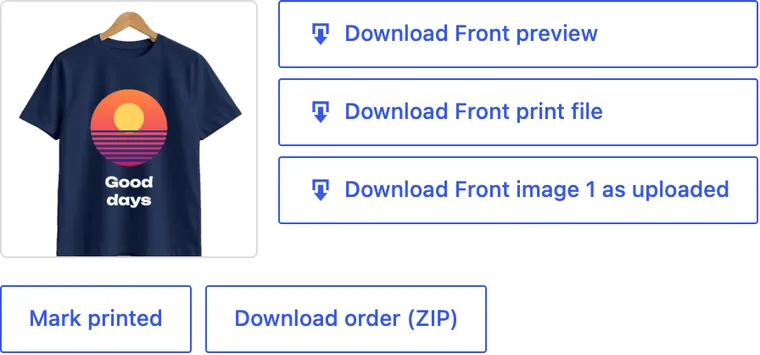
PrintBlob does not arrange those files on a sheet. Place them with your printer’s RIP software, if it nests files, or with an imposition tool; the WordPress.org directory lists one, File Splice, which sends the files to its own paid service to make the sheet. A gang sheet builder plugin and PrintBlob can sit in the same shop on different products: the builder on the gang sheet product, the designer on the shirts.
Questions shop owners ask
Is there a gang sheet builder for WooCommerce?
Yes. In the WordPress.org directory on 21 October 2026: DTFBuild Gang Sheet Builder, which connects your shop to the DTFBuild service and needs an account, and record7 Gang Sheet Studio, which runs in your own site, with automatic nesting in its separate Pro edition. WooCommerce has none of its own.
Can I sell gang sheets in WooCommerce without a builder?
Yes. Make a variable product with a variation per sheet size, and add a file upload field with a product add-ons plugin, so customers upload a finished sheet with the order. You check each file before printing.
Does PrintBlob build gang sheets?
No. PrintBlob is a product designer: customers put their design on a product, such as a t-shirt. It does not arrange designs on a sheet or sell sheets by size. PrintBlob Pro gives you each printed side as a transparent PNG at 300 DPI, which you place on your own sheets with your RIP software or an imposition tool.
How many pixels is a 22 × 50 in gang sheet?
6600 × 15,000 pixels at 300 DPI: the inches times 300 in each direction. A 55 × 55 cm sheet is 6496 × 6496 pixels.
Can a gang sheet builder and a product designer be in the same shop?
Yes, on different products: the builder on the gang sheet product, where customers buy film to press themselves, and the designer on the shirts, where they buy a printed shirt.
To set up the shirts side of the shop, read How to make a custom t-shirt website with WooCommerce, and to try the designer, open the live demo.
Get PrintBlob Pro
Pro adds print-ready files, back printing, a 3D view and a production print queue to the free designer. Paid with Stripe in US dollars, no tax added; one domain per licence.
$69 a year
Full refund within 14 days
Limited-time offer until 31 December 2026
$99 once
Full refund within 14 days