What you need to start a t-shirt printing business: equipment, supplies and an online shop
The equipment and supplies a t-shirt printing business needs for each print method, starting with a heat press and bought transfers, what size of heat press fits which prints, what working from home asks of the room, and how to take orders online.
Published , by the PrintBlob team.
To start a t-shirt printing business with the least equipment, you need a heat press, transfers to press (bought ready-printed from a transfer supplier, or printed on your own DTF printer), blank shirts, a computer to prepare and check files, and a way to take orders, such as your own online shop. A heat press with bought transfers is the smallest set-up that prints full-colour designs on any colour of shirt: there is no printer to buy, run or clean. A printer of your own (DTF, DTG or sublimation), a vinyl cutter, or screen printing equipment each adds more to buy and a different kind of work.
This guide sets out what each method needs, which heat press fits which prints, what working from home asks of the room, and how orders reach you. It quotes no equipment prices, because they change quickly and differ by country: price your set-up from your suppliers’ current quotes.
The smallest set-up: a heat press and bought transfers
Transfer Express, a supplier of transfers and heat presses, writes in its starter kit guide (published January 2019, updated January 2026) that a heat press is the one machine you need: you buy transfers printed to order and press them onto blank garments, with no printer of your own. Its guide also warns against buying the cheapest presses.
With this set-up you need:
- A heat press, sized for your largest print (below).
- Transfers, DTF or another heat transfer, ordered from a supplier as single transfers or on gang sheets.
- Blank shirts in the colours and sizes you sell, bought from a blank wholesaler. Order one of each style first and press a test.
- Small tools: heat-resistant tape, a protective sheet between the plate and the print (Teflon or baking paper), a lint roller to clean the shirt before pressing, and a ruler or guide to place the print straight.
- A computer to prepare customers’ files and check them before you order transfers.
The trade-off is the wait and the cost per print: every design goes to the supplier and comes back, and you pay their price per transfer. The DTF pricing calculator shows the cost per shirt from what a supplier charges for a gang sheet.
What each print method adds
| Method | What you buy beyond a heat press | Prints on | Good for |
|---|---|---|---|
| Bought transfers (DTF or other heat transfers) | Nothing else; transfers per order from a supplier | Any colour; cotton, polyester and blends | Starting, and one-off designs |
| Your own DTF printer | DTF printer, film, inks, adhesive powder, a way to cure the powder | Any colour; cotton, polyester and blends | One-off designs in full colour, printed the same day |
| Your own DTG printer | DTG printer, inks, pre-treatment and a way to apply it | Best on cotton; dark shirts need pre-treatment and white ink | The softest print on cotton |
| Heat transfer vinyl | A vinyl cutter, vinyl, weeding tools | Any colour | Names, numbers and simple shapes in one or a few colours |
| Sublimation | A sublimation printer, sublimation ink and paper | White or light polyester only | All-over prints on polyester, mugs |
| Screen printing | Screens, emulsion, an exposure unit, a press, inks and a dryer; a heat press is not needed | Any colour | Runs of the same design |
DTF vs DTG vs screen printing compares the three most used methods for online orders in detail: how each works, the file it needs and where its costs and minimums come from.
Which heat press size you need
The press’s plate, its platen, has to cover the whole print. Transfer Express’s starter packages, as its guide lists them, come with 15 × 15 in, 16 × 16 in and 16 × 20 in presses, and it describes an 11 × 15 in platen as for children’s clothing and the 16 × 20 in as the one for larger prints.
Compare the platen with the prints you sell. What size should a t-shirt design be? gives a full front of 12 × 16 in (30.5 × 40.6 cm), which is taller than a 15 × 15 in platen (38 × 38 cm) and fits on a 16 × 20 in one (41 × 51 cm). PrintBlob’s bundled t-shirt prints 28 × 36 cm on the front, which fits on both. If you will print hoodies, read What size should a hoodie design be? before you choose.
Presses also differ in how they open: a clamshell opens like a mouth and takes the least room; a swing-away moves the hot plate away from the shirt, so you can place the print without reaching under it; a draw press slides the lower plate out towards you. Read the maker’s manual for the temperature control and whether the pressure can be set, because transfers come with a temperature, a time and a pressure to press them at.
Working from home
- Power: a heat press draws a lot of current while it heats. Check its rating on the maker’s specification against the circuit you plug it into, and do not share that socket with a kettle or a heater.
- Air: a DTF printer’s ink and the adhesive powder give off fumes while the powder cures. Follow the printer maker’s guidance on ventilation or fume extraction before you print at home.
- Space: a table at working height for the press, room to lay shirts flat, shelves for blanks by colour and size, and somewhere clean for finished orders.
- Rules: where you live may ask you to register a business or have a licence, even for one run from home, and your sales may carry tax. Check with your local authority before you sell.
Files and designs
Most of what goes wrong in a print comes from the file: a design too small for its print size, a white box round a logo, a soft shadow that prints as specks. Before you start taking orders, read Print-ready t-shirt files and DTF print file requirements, and use the print size tool to see how large an image can print sharply.
Taking orders online
You can take orders by message and email at first, but every order then needs its design, its size, its colour and its placement written down and checked by hand. An online shop where customers design the shirt themselves sends you all of it with the order.
PrintBlob is a free product designer for WooCommerce, the shop plugin for WordPress. With the free plugin, customers design on the front of its bundled t-shirt, in every colour you sell, recoloured from one photo, and every order keeps its design, its preview on the product and the customer’s images. They see a warning when an image is below 150 DPI at the size they placed it.
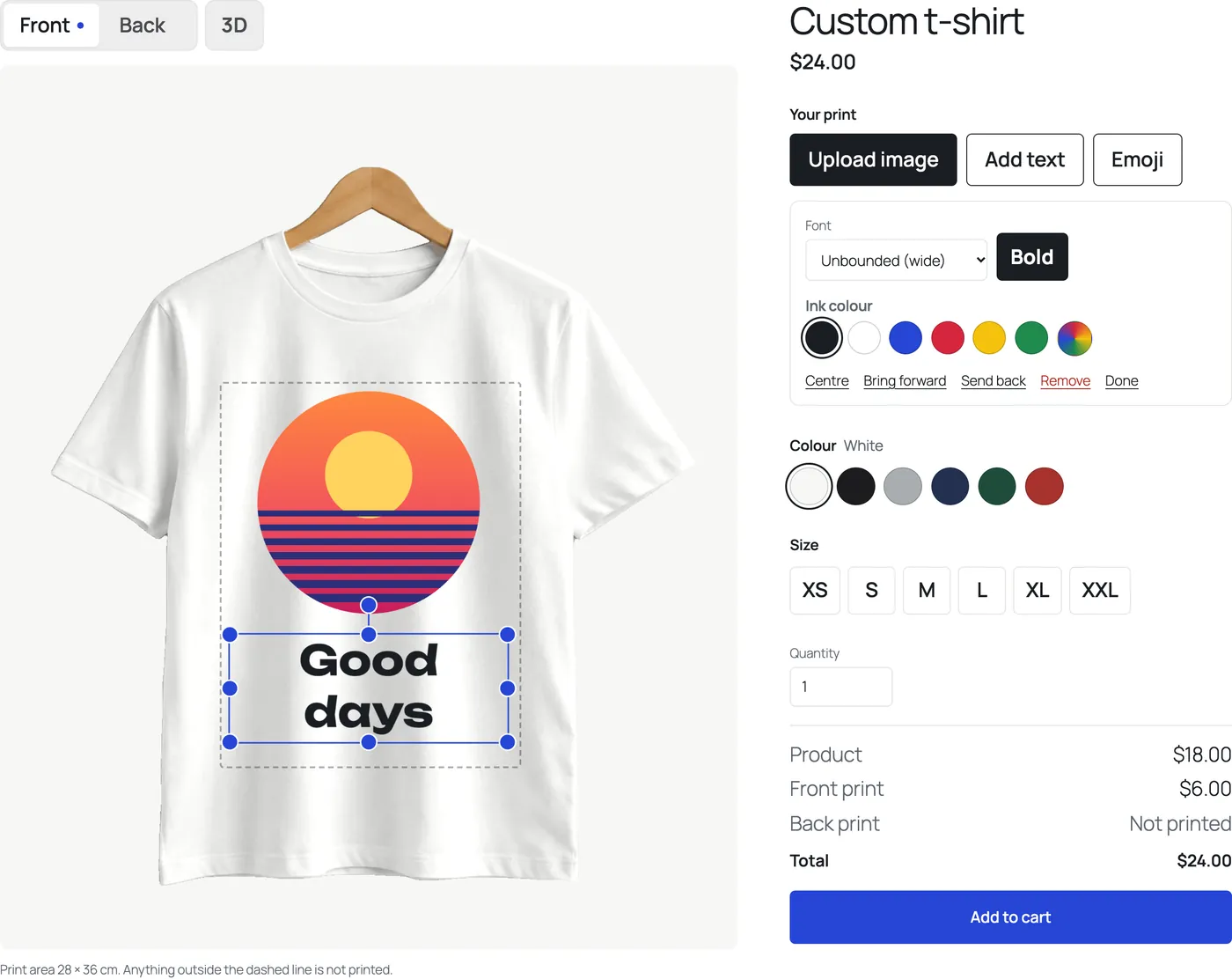
PrintBlob Pro adds your own products and photos, such as hoodies, mugs and bags, back and sleeve printing, a transparent PNG of each printed side at 300 DPI with every order, ready to send to your transfer supplier or to print, with a vector PDF and an SVG of each side for screen printing and cutting, a print queue, your shop’s own fonts, design templates, a clipart library, names and numbers for team orders and a 3D view. PrintBlob does not curve text and builds no gang sheets; it is not a print-on-demand service either, so you print and ship every order yourself.
How to make a custom t-shirt website with WooCommerce builds the shop step by step, and How to price custom t-shirt printing sets the prices; the t-shirt printing cost calculator works out what each shirt costs you by method.
Before your first sale
- Choose how you will print. Start with a heat press and transfers bought from a supplier, or choose your own DTF, DTG or sublimation printer, a vinyl cutter, or screen printing, by the designs and quantities you expect.
- Buy a heat press for your largest print. Compare its platen with the largest print you will sell: a full front of 12 × 16 in (30.5 × 40.6 cm) needs a platen taller than 15 × 15 in, such as 16 × 20 in.
- Buy blanks and test them. Order one shirt of each style and colour you will sell from a blank wholesaler, press a test transfer on each at the supplier’s temperature, time and pressure, and wash it.
- Set up the room. Check the press’s power rating against its circuit, give a DTF printer the ventilation its maker asks for, and keep blanks and finished orders apart from the press.
- Open the shop. Make the shirts as variable products with their colours and sizes, add a product designer so customers design the shirt themselves, and set a price for the shirt and for each printed side.
- Place a test order. Order a shirt as a customer, then print, press, pack and ship it, and check that the print is where and as large as the designer showed it.
Questions shop owners ask
What equipment do I need to start a t-shirt printing business?
With the least equipment: a heat press, transfers bought from a supplier, blank shirts, a few small tools such as heat-resistant tape and a protective sheet, and a computer to check files. Your own DTF, DTG or sublimation printer, a vinyl cutter, or screen printing equipment each add more.
Can I start a t-shirt business with just a heat press?
Yes. Transfer suppliers print your designs as transfers, single or on gang sheets, and you press them onto blank shirts. You pay their price per transfer and wait for each delivery, but you buy no printer.
What size heat press do I need for t-shirts?
One whose platen covers your largest print. A full front of 12 × 16 in (30.5 × 40.6 cm) is taller than a 15 × 15 in platen and fits on a 16 × 20 in one. The t-shirt that comes with PrintBlob prints 28 × 36 cm on the front, which fits on both.
How much does it cost to start a t-shirt printing business?
It depends on the method more than anything: with bought transfers, the heat press and your first blanks are most of it; your own printer adds the printer and its supplies. Equipment prices change quickly and differ by country, so price your set-up from current quotes, and work out the cost per shirt with a cost calculator.
Do I need a website to sell custom t-shirts?
Not to start, but an online shop where customers design the shirt themselves sends you the design, colour, size and placement with every order instead of in messages. PrintBlob is a free product designer for WooCommerce that does this for a t-shirt.
Does PrintBlob print or ship the shirts?
No. PrintBlob is a plugin for your own shop, not a print-on-demand service: customers design and order, and you print and ship. With PrintBlob Pro, each order brings a print-ready PNG of every printed side to print or send to a transfer supplier.
When the orders come in, A checklist for running a WooCommerce print-on-demand shop covers the rest, and the live demo shows what your customers would design on.
Get PrintBlob Pro
Pro adds print-ready files, back printing, a 3D view and a production print queue to the free designer. Paid with Stripe in US dollars, no tax added; one domain per licence.
$69 a year
Full refund within 14 days
Limited-time offer until 31 December 2026
$99 once
Full refund within 14 days