Products
Turning the designer on for a product, choosing its mockup and pricing each printed side.
The designer is turned on per product, in the product’s PrintBlob designer tab.
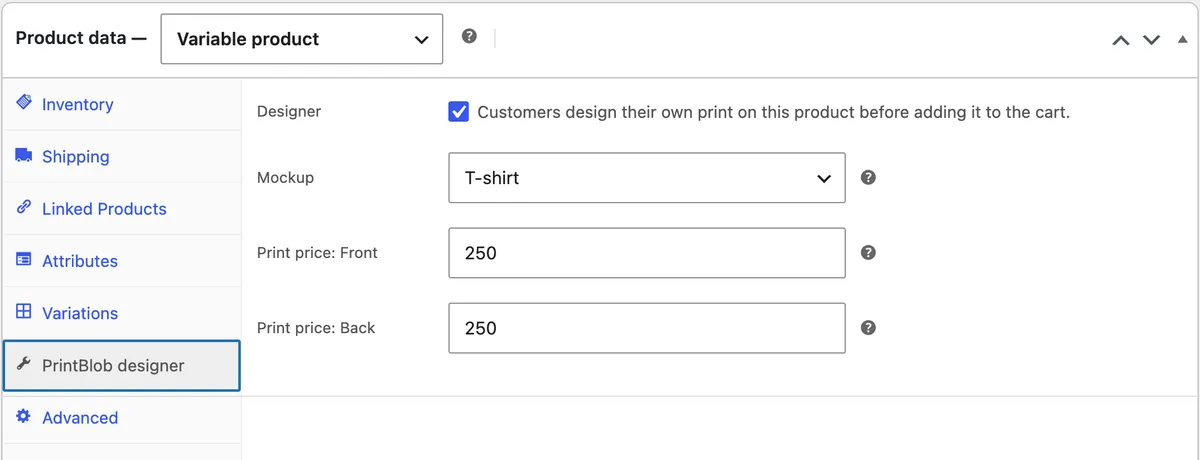
- Edit the product and open Product data › PrintBlob designer.
- Tick Designer: “Customers design their own print on this product before adding it to the cart.”
- Choose the Mockup customers design on.
- Enter Print price: Front and Print price: Back. Each is added to the product price when that side has a print.
- Update the product.
Variable products
Use a variable product with your colour and size attributes to sell sizes and colours with their own prices and stock. The designer shows colour swatches and size buttons, keeps sold-out combinations unavailable, and adds the matching variation to the cart.
In the cart and the order
The cart shows a preview of the design and which sides are printed. On the order screen each designed item shows a preview per side and Download (side) print file. Print files are stored in a protected folder; only shop managers can download them.