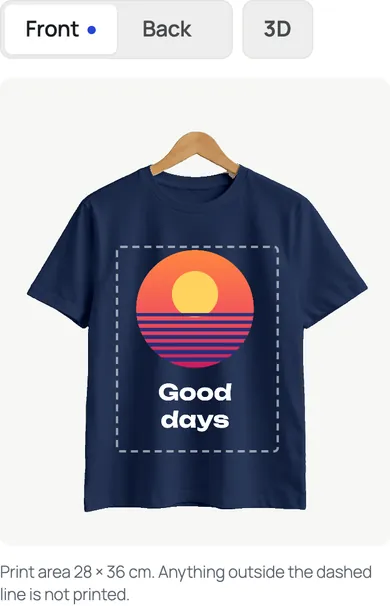
The most modern product designer for WooCommerce. Customers design on the product page, and every order keeps the design and the front’s print-ready files.
No watermark, ever
No card and no account
From the WordPress.org plugin directory
Install it in your shop
Type your shop’s address. Your own WordPress opens with PrintBlob found: select Install Now, then Activate.
printblob.com keeps your shop’s address, to know which shops try PrintBlob.
Download the zip
In WordPress, open Plugins › Add Plugin › Upload Plugin and choose the file.
PrintBlob 1.7.12, free (GPL)
Zip, 1.8 MB. Requires WordPress 7.0, PHP 7.4; tested up to WordPress 7.1. The same files are in the WordPress.org plugin directory, where WordPress installs and updates it from.
Your own copy of a ready t-shirt shop on InstaWP, with WooCommerce, PrintBlob and the free t-shirt shop theme, signed in and free for 4 hours. InstaWP asks for your email, and the shop’s Make it yours button keeps it in an InstaWP account of your own, on an InstaWP plan you choose.
PrintBlob for Shopify puts the same designer on the product pages of a Shopify shop. It is not on the Shopify App Store yet: see what it does, and try it in its demo shop.
[PrintBlob – Free Custom T-Shirt Designer & Product Customizer for WooCommerce] Works like a charm, seamless
I installed and upgraded to PRO with one click, love it. I just figured out that it creates 3D product view just with back and front side image of the product. Fully recommended! I use it on my website: [URL removed by moderators]
Open PrintBlob › Quick setup and select Set up my shop: it makes a t-shirt customers can design.
Select Open the product and design a print as your customers will.
Order it, then open the order: the design and the front’s print files are there.
PrintBlob needs WordPress 7.0, WooCommerce 10.0 and PHP 7.4 or newer. Installation guide
What you get for free
The designer on the product page or any page: photos, logos and text, moved, resized and rotated on the product
Every colour of the product from one photo, and the Colours block
Every order’s design kept with it: the design itself, its preview on the product, and the customer’s images
Print-ready files of every order’s front: a transparent 300 DPI PNG, a vector PDF and an SVG at the exact print size, made as the design is added to the cart
WooCommerce’s block cart and checkout, order emails and custom order tables
PrintBlob Pro adds back printing, a 3D view, a production print queue when you need them. Free and Pro compared
 PrintBlob for Shopify