Print queue: every design waiting to print, oldest first
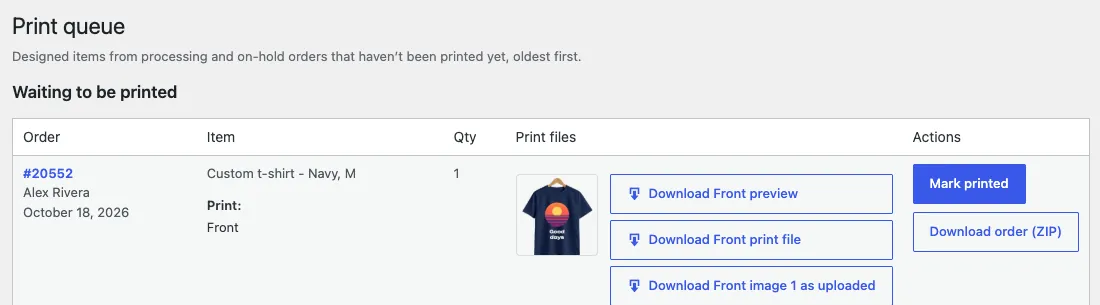
PrintBlob Pro adds a print queue to WooCommerce: PrintBlob › Print queue lists every designed item of processing and on-hold orders that has not been printed yet, oldest first, with its previews and print files. Mark printed takes an item off the queue and records it in an order note, and Download order (ZIP) gives all of an order's print files in one ZIP with a print list.
PrintBlob Pro
Published , updated , by the PrintBlob team.
Free or Pro?
- Pro A print queue, with each order’s print files in one ZIP.
What does the print queue show?
Every designed item waiting to be printed, oldest first, each with its previews and print files, so nobody opens orders one by one to find a design.
Who is it for?
A shop that prints several orders a day, where finding each design’s files inside its order takes longer than printing it.
What does it not do?
It does not send files to a printer, nest designs on a gang sheet or send orders to a print-on-demand service. It lists what is waiting and hands you the files.
How do I print from the queue?
- Open the queue. With PrintBlob Pro, open PrintBlob › Print queue. Designed items of processing and on-hold orders are listed oldest first.
- Download the order. Download order (ZIP) gives each printed side's PNG, PDF and SVG, the customers' images and a print list of products, colours, sizes and print sizes.
- Mark it printed. Mark printed takes the item off the queue, and an order note records it. Undo, in the notice that follows and on the order screen, puts it back.
Set it up
- PrintBlob Pro
PrintBlob Pro adds your own products and photos, back and sleeve printing, a 3D view, design templates, a clipart library, quantity breaks, names and numbers for team orders, a print queue with ZIP downloads, your own fonts, the customers' original images, and the print files of every other side and of earlier orders, and CMYK PDFs through your printer's profile.
- Print-ready t-shirt files: format, transparency and resolution
What makes a t-shirt print file ready to print: a transparent PNG at 300 DPI at the printed size, or a vector file where the method takes one. Why customer photos print blurry, why backgrounds print as boxes, and what DTG, DTF, screen printing, vinyl and embroidery each need from you.
Questions
Which orders are in the print queue?
Designed items of processing and on-hold orders that have not been printed yet, oldest first.
Can I undo Mark printed?
Yes. Undo is in the notice that follows and on the order screen, and it puts the item back on the queue.
What is in an order's ZIP?
Each printed side's PNG, PDF and SVG, the customers' images as they uploaded them, and a print list of products, colours, sizes and print sizes.
Does it work for orders placed before I added PrintBlob Pro?
Yes. The free plugin keeps each order's design, so PrintBlob Pro makes the print files of earlier orders from their saved designs, in the print queue.
Start free, add Pro when you need it
Pro adds back printing, a 3D view, a production print queue, CMYK PDFs and the print files of earlier orders to the free designer. Paid with Stripe in US dollars, no tax added; one domain per licence.
Free no card, no account
Download PrintBlob freeNo watermark, ever
Limited-time offer until 31 December 2026
Regular price $99$69 for the first year, then $99 a yearFull refund within 14 days
Limited-time offer until 31 December 2026
$99 once
Full refund within 14 days
Try it on your own shop
PrintBlob is free in the WordPress.org plugin directory: install it, turn the designer on for a product and take a design order. PrintBlob Pro is $99 once for a lifetime licence (limited-time offer until 31 December 2026) or $69 for the first year (limited-time offer until 31 December 2026), then $99 a year, with a full refund within 14 days.